Showing posts with label cloud computing. Show all posts

Saturday, August 27, 2022

DevStack on Ubuntu 20.04

I need a small IaaS cloud infra for my CMSC291: Modern Distributed Systems class this semester so I decided to set up an OpenStack instance on one of SRG's servers running Ubuntu 20.04. I have used OpenStack in the past so I'm quite comfortable using it.

What is DevStack?

"DevStack is a series of extensible scripts used to quickly bring up a complete OpenStack environment based on the latest versions of everything from git master. It is used interactively as a development environment and as the basis for much of the OpenStack project’s functional testing."

                                                                                    - https://docs.openstack.org/devstack/latest/

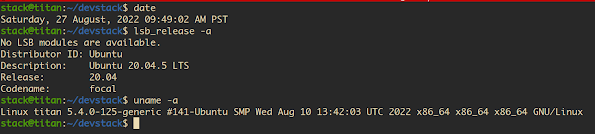
[1] I thought the process will be straightforward but unfortunately minor tweaks were needed. Below is the configuration of the host.  

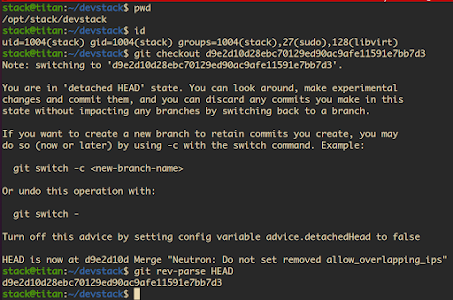
[2] This is the commit hash that worked for me, make sure to checkout this particular commit : d9e2d10d28ebc70129ed90ac9afe11591e7bb7d3


[3] Get the IP address of the host (using ifconfig) and export it as HOST_IP environment variable. Let's say the IP address is 192.168.3.100.

        $export HOST_IP=192.168.3.100

[4] Prepare the local.conf file as described in the doc.

[5] Edit lib/neutron_plugins/ovn_agent. 

Change OVS_RUNDIR=$OVS_PREFIX/var/run/openvswitch 
to OVS_RUNDIR=$OVS_PREFIX/var/run/ovn

[6] Unstack and Clean.

        $sudo apt install neutron-metadata-agent
    $sudo apt install neutron-openvswitch-agent
    $sudo pip install uwsgi
    $./unstack.sh
    $./clean.sh
    
[7] A few directories need to be removed as well as do some other stuff:

    $sudo rm /var/run/ovn/openvswitch
   $sudo /usr/share/openvswitch/scripts/ovs-ctl restart
   
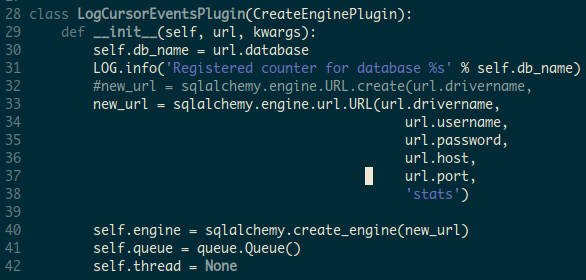
    edit tools/dbcounter/dbcounter.py


[8] Stack. This may take a while so grab a cup of coffee.


         $./unstack.sh
    $sudo rm -fr /var/run/ovn
    $./stack.sh
        
A successful installation after ~12 minutes!


[9] Launch an instance.


[10] TODO: Configure Floating IP addresses and add glance images.

Friday, June 29, 2018

Enable non-live migration in Openstack Juno on Ubuntu 14.04

Simply change the shell of the nova user to /bin/bash

$sudo usermod -s /bin/bash nova

Tuesday, June 14, 2016

Five important tasks in operating an OpenStack private cloud

After the initial cloud setup, there are important tasks for a successful cloud operation.

1. Account Processing

This task involves creating projects and users.

2. Backup Procedure

Backup of configuration settings (keystone, glance, nova), disk images, instances, and most importantly the database.

3. Restore Procedure

Using the backup data, a new/replacement node should be configured easily.

4. Upgrade Procedure

Upgrade of hardware, operating system, openstack version.

5. Regular Maintenance

Other stuff that must be done regularly such as documentation, testing, integrity check, etc.


Sunday, June 12, 2016

Recover corrupted InnoDB MySQL database for OpenStack

Summary

Due to power outages in the campus and not having backup power, the P2C cloud controller MySQL database was corrupted and the mysql daemon will not start. Worst of all, I don't have any backup! Essentially, P2C operation was halted. My main concern is to recover the disk images (glance), and if possible the user accounts (keystone) and the instances (nova). The controller uses Ubuntu Server(14.04) and MariaDB(5.5.49). In this guide I will discuss how I manage to PARTIALLY recover the cloud controller's database.

The corrupted file was /var/lib/mysql/ibdata1, a file used internally by mysql. It is possible to recover this file if  innodb_file_per_table is set, which LUCKILY is the case in my setup.

Steps

1. A backup of the entire /var/lib/mysql of the controller (will be referred to as M1) should be created first.

$sudo tar czvf p2c.controller.mysql.tar.gz /var/lib/mysql

2. Setup a different Ubuntu Server 14.04 machine(will be referred to M2) with MySQL version 5.6.30  (using apt-get). According to [1], 5.6 has the features needed to recover data from .frm and .ibd. More difficult methods exist [2][3].

3. Extract the backup created in step one on M2.

$sudo -s
#tar xzvf p2c.controller.mysql.tar.gz

4. Install mysql utilities on M2

#apt-get install mysql-utilities

5. Start with recovering keystone. I wrote the script below to automate the process. Run this script inside keystone.(WARNING!!Make sure that there are no other MySQL databases on M2.) The variables at the start of the script must be set based on your settings. Running the script takes a while.

#cd var/lib/mysql/keystone
#chmod 755 innodb-recovery.sh 
#./innodb-recovery.sh

6. If all goes well, mysql now contains the recovered data. You can dump it now.

#mysqldump --force -u root -p keystone > keystone.recovered.sql

7. Go to inside glance and nova and perform steps 5 and 6.

8. Copy back keystone.recovered.sql, glance.recovered.sql, nova.recovered.sql to M1.

9. Restore the dumps.

#rm /var/lib/mysql/ibdata1
#rm /var/lib/mysql/ib_logfile0
#rm /var/lib/mysql/ib_logfile1
#service mysql restart

#mysql -u root -p
mysql>drop database keystone;
mysql>create database keystone;
mysql>drop database glance;
mysql>create database glance;
mysql>drop database nova;
mysql>create database nova;
mysql>exit

#mysql -u keystone -p keystone < keystone.recovered.sql
#mysql -u glance -p glance < glance.recovered.sql
#mysql -u nova -p nova < nova.recovered.sql

#service mysql restart

10. Reboot the controller and hope for the best.

#reboot

Final Words

The process described here did not recover the data 100%. The following were observed:
  • Glance/Nova image list is empty though the images are still in the filesystem. These images must be again created (glance image-create).
  • Fixed network must be created (nova network-create)
  • Floating IPs must be created (nova floating-ip-bulk create)
  • ALL information on instances were lost, VMs however remained in their respective hosts.
  • Security groups must be created again.
  • Key Pairs must be generated again. 
  • It took me a weekend for this.


Wednesday, January 27, 2016

APAN 41 Manila - Day 4

27 January 2016

Today I attended the Network Engineering Workshop. The abstracts and slides of the talks are here. This workshop is by far the most organized which started and finished on time.

Majority of the talks described their home institution's current network infrastructure as well as their future plans. They are slowly moving to 100Gbps connections( the term is Long Fat Networks or LFNs) from 10Gbps.

There were also some presentations on protocol modifications (TCP in particular) in order to support 10/100 Gbps transfer over long distances across the Pacific Ocean.

Tuesday, January 26, 2016

APAN 41 Manila - Day 3

26 January 2016

Today I attended most of the sessions from the Cloud Working Group.


Talk: More than Three Years of OpenStack Clouds at NCI
Speaker: Andrew Howard, NCI High Performance, andrew.howard@anu.edu (via Skype)

In this talk, Andrew talked about the history of their OpenStack deployments at NCI. It is surprising to know that they have deployments using different versions. At this point in time, they are experimenting with using Ceph for storage. One person from the audience asked how they keep up with the rapid release of newer versions of OpenStack in order to keep updated. They use fibre channel for connectivity.


Talk: Application-Centric Overlay Cloud Utilizing Inter-Cloud
Speaker: Shigetoshi Yokohama

This is a short talk about the use of cloud in big data analysis. The middleware group where the speaker is a member of, focuses on automatic and quick creation of virtual clouds.  Other groups are working on aspects such as optimal resource selection and infrastructure.


Talk: SmartX Playground Update
Speaker: JongWon Kim, gwangju institute of technology

This talk is more of an update of the SmartX Playground which integrate the recent technologies such as SDN and IoT with clouds. 


Talk: National Computing Center Singapore
Speaker: 

This talk describes some updates on the NCC in Singapore. It is located in the 7th floor. They use the term InfinCloud because they use Infiniband interconnect. Their facility is state of the art.


Talk: Kreonet cloud update
Speaker: Yoonjoo Kwon, Kisti

This talk is about some updates on the Kreonet, including COREEN and RealLab. 


Talk: VM Migration on SDNs
Speaker: Kashir Nifan

This talk is about a VM migration mechanism implemented in Java. 


Talk: Collaboration with APAN WG
Speaker: Eric Yen, Academia Sinica

In this talk Eric emphasized that collaboration must be made in order to encourage members of other working groups to utilize the infrastructure developed from the Cloud WG. He said that the requirements should drive the cloud facility.


In the afternoon, I attended sessions on Future Internet Testbeds. Testbeds are real/virtual networks where researchers can experiment with new ideas.

The day ended with a fellowship dinner with some presentations from local talents.

Thursday, May 14, 2015

Speed up VM startup in OpenStack Juno

By default Nova deletes unused images in compute nodes after 24 hours. If you start an instance in which the image is no longer in the compute node, a transfer of the image from Glance is performed which increases the instance start up time. To override this, simply add the following line in the default section of nova.conf and restart the nova-compute service. The line will disable the removal of unused images from the compute nodes.
remove_unused_base_images = False

Thursday, July 3, 2014

Reset/Reinitialize nova (openstack)

Sometimes the contents of the nova database are not updated properly when instances are deleted through the dashboard. This creates clutter because the instances with ERROR status remain in the dashboard list and cannot be deleted (in my case, no matter how many times I try). Some guides describe how to delete the problematic instances manually by accessing the nova database then deleting the appropriate entries in the affected tables using SQL. If you are working on an experimental system, reinitializing the entire nova database may be easier and faster. Perform the steps below on the controller node. WARNING: This will delete everything in the nova database. This is tested only on the havana version of openstack.

$mysql -u root -p
mysql>drop database nova;
mysql>create database nova; 
mysql>grant all privileges on nova.* to 'nova'@'%' identified by 'yournovapassword';
mysql>grant all privileges on nova.* to 'nova'@'localhost' identified by 'yournovapassword';
mysql>flush privileges;
mysql>exit
$sudo nova-manage db sync
After issuing the above commands, you need to restart all nova services on the controller node.

$sudo service nova-api restart
$sudo service nova-cert restart
$sudo service nova-consoleauth restart
$sudo service nova-scheduler restart
$sudo service nova-conductor restart
$sudo service nova-novncproxy restart
$sudo service nova-network restart

You also need to restart nova-compute on the compute nodes.

$sudo service nova-compute restart

You may need to do the following after:
  • Add custom flavors (nova flavor-create)
  • Add VM networks (nova net-create)
  • Add floating IP pool (nova floating-ip-bulk-create)
  • Edit the security rules for a project to access instances (best done through the dashboard)
*Note: The common cause of being unable to terminate instances is that the hypervisor is unreachable.
References: